
Docs Surfaces
FNS_Navbar
Pane-bar extras: parent-hierarchy navigation, path injection and drag-drop hijack, plus the navbar Configurator.
▦ Surfaces
NavBar Mods
There's a lot of NavBar Mods that help you working with Custom Pars, parent and global shortcuts, as well as iops.
The NavBar mod adds a new button  to the left from the path bar.
Clicking this button will open a popup showing the
to the left from the path bar.
Clicking this button will open a popup showing the iops available from the current COMP you are in, meaning the iops of all the parents are listed.
You can drag and drop these to your network editor, or use it for a quick overview and navigation to them. Super useful if you ask me!
Path Bar mods
Dragging an operator onto one of the parents in the Path Bar, and holding Ctrl+Alt (or Ctrl+Cmd) will promote the operator as an iop (internal operator).
Dragging a parameter onto one of the parents in the Path Bar will promote it to that parent.
- ‼️
MiddleClickingon a parent will open its parameter window. - ‼️‼️
Long-MiddleClickingon a parent will open its customize window.
Parent Hierarchy
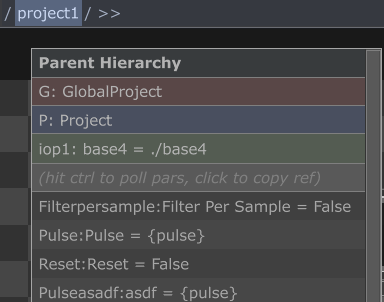
Hovering over individual elements in the navigation path bar and holding Alt will show the Parent Shortcut (P), Global Shortcut (G) and Internal Operators (iop) for that COMP only.
Furthermore holding Ctrl will show the relative path of the iop target as well as all custom parameters and their values. You can hit Ctrl again to poll the values.
- Clicking on any of the items will copy a reference to that object
- You can then paste this to any expression or script
- Right-Clicking on any of the parameters will open the parameter customization window of that param